 RenovationRoute
Every customer inquiry,
in one place
Customers reach out by text, email, phone, and your website. The ones who slip through the cracks are jobs you lose. Send them one link instead. Every request comes in through your branded form, lands in one inbox, and gets an instant reply.
No credit card · Your branding, not ours · Set up in minutes
However they reach you, it ends up in one inbox
Everything comes in through your branded form. Instead of trading texts and emails back and forth, you send the link. It lives on your website too.
Text or email
A customer texts or emails you? Reply with your form link. Their details come in organized, not buried in a thread.
Your website
Put the form on your website or Google profile. Every request opens a ticket and gets an instant branded reply.
Phone call
Took the call yourself? Log it in a few taps and it opens the same kind of ticket, so nothing lives on a notepad.
From new customer to getting the job
- 1
Share your link
We give you a link with your company name and logo. Put it on your website or Google profile, or text it to a referral.
- 2
They submit, you both get notified
The customer fills out a short form for the project summary and best time to reach them. They get an instant ticket, you get the lead.
- 3
Spam gets filtered
Optional spam filtering means you spend time on real customers, not bots.
- 4
We draft the response
Your template plus their answer becomes a near-ready reply. Review, edit if needed, and send. It emails them and updates the ticket.
- 5
We nudge if they go quiet
Automatic follow-up keeps the conversation alive until you have what you need to quote.
- 6
Quote and get paid, your call
Use automated quoting and turn it into a RenovationRoute project to get paid on the platform, or take the details and write your own. Up to you.
What your customer sees, and what you see
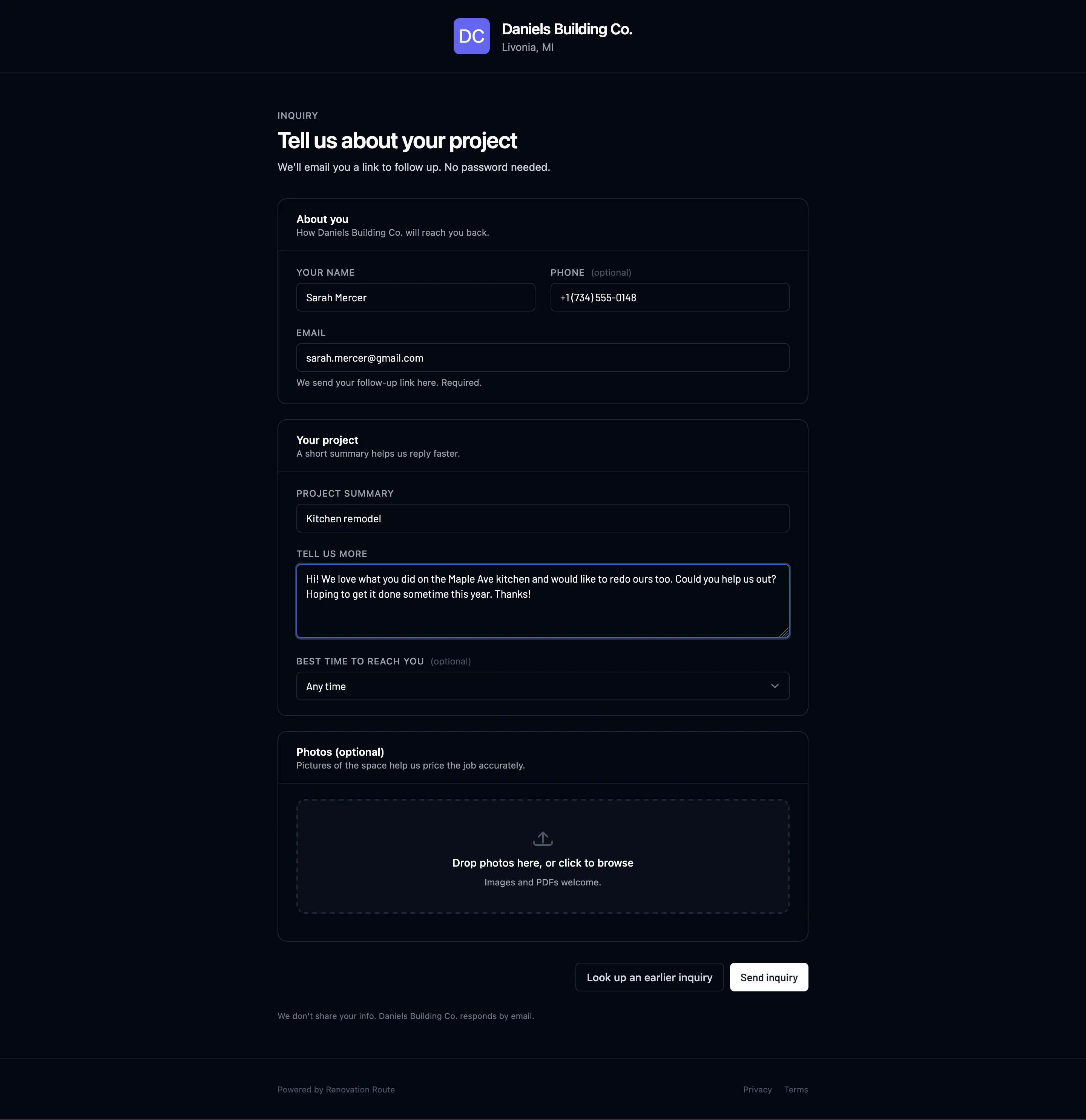
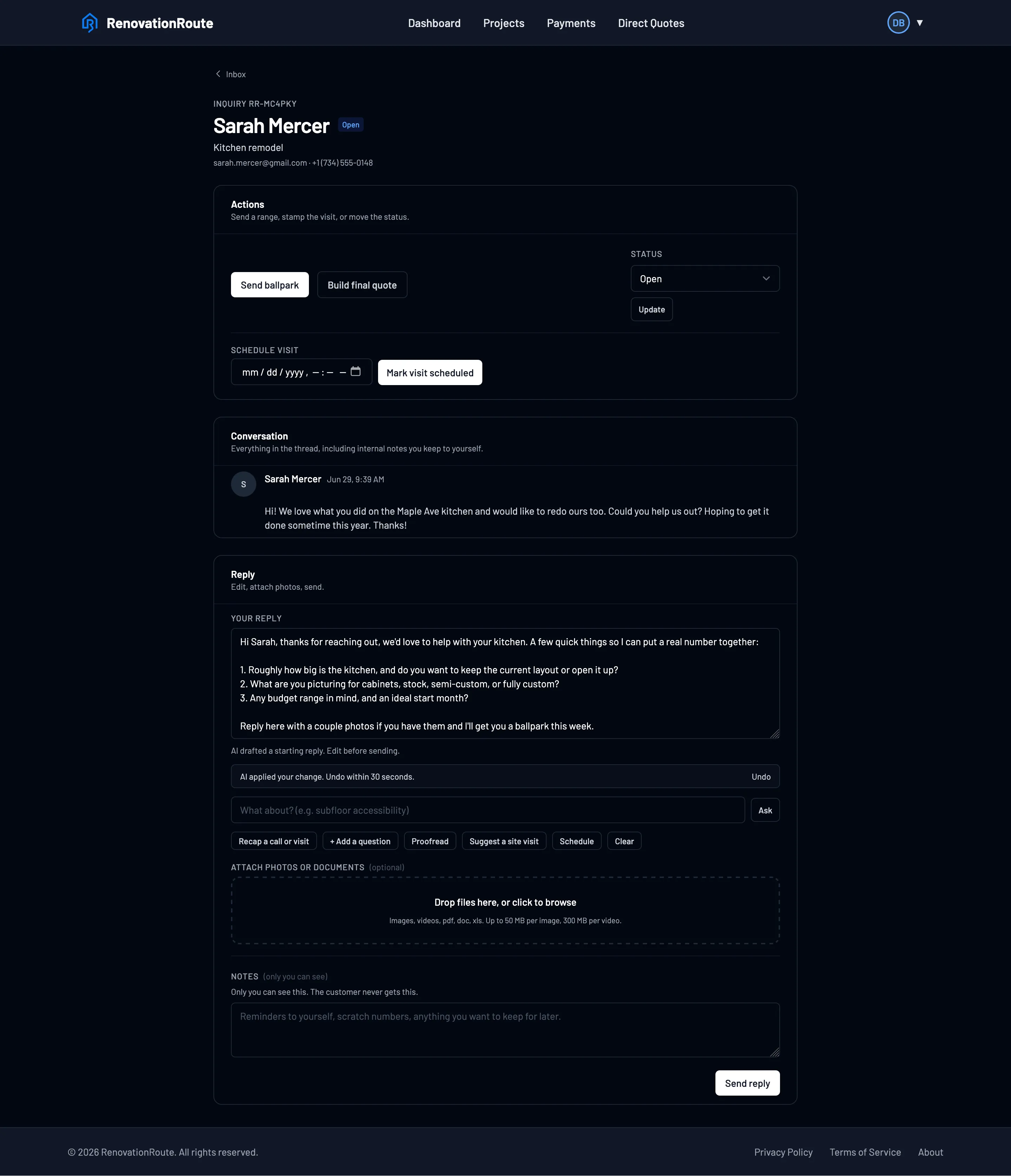
Real screens. Your company name and logo, your message. The customer never sees RenovationRoute.
Slow replies lose the job
Harvard Business Review audited 2,241 companies: the average reply to a new inquiry took 42 hours, and 23% never responded at all. By then the customer has usually called someone else. Your reply goes out the second they submit.

I built this because I couldn't keep up with my own customers. Between running jobs, I'd go days without replying, or miss an inquiry entirely and not catch it until weeks later. Not good for them, not good for me.
So now every new customer hears back the second they reach out, and I nudge the quiet ones without thinking about it. If you are losing customers to a slow reply, I'd love a few of you to try it.
Jesse Edwards · Owner
Stop losing customers to a slow reply
Free account. Your branding on every message. Set up in minutes.
Customer Inquiries FAQs
Straight answers for contractors drowning in new customer messages
How do new customers reach me through RenovationRoute?
You get a branded link with your company name and logo. Put it on your website, your Google profile, or text it to a referral. The customer fills out a short form and instantly becomes a tracked ticket. You can also log a phone call by hand, which opens the same kind of ticket so everything lives in one place.
What happens the moment a customer submits?
They get an automatic email with a ticket number, branded to your company, so they know you received it. You get notified, and the inquiry lands in your inbox. We treat every inquiry like a support ticket so nothing slips through.
Do I have to write every reply from scratch?
No. You set up a template once for the information you need to collect. When the customer replies, we combine their answer with your template and auto-draft a near-ready response. You review it, edit if needed, and send. It emails the customer and updates the ticket so they can reply back.
What if the customer goes quiet?
We auto-nudge them for you. You do not have to remember to follow up, and customers do not fall through the cracks because you got busy on a job.
Does it filter out spam?
Yes, optional spam filtering means you spend your time on real customers instead of bots and junk submissions.
Does RenovationRoute read my email inbox?
No. RenovationRoute is not your email client. New customers come in through your branded link or a call you log, and everything stays in one place so you are not chasing threads across your inbox.
Will the customer know it is RenovationRoute?
No. The form and the emails carry your company name and logo. As far as the customer is concerned, they are talking to you. RenovationRoute runs quietly in the background.
Can I turn an inquiry into a quote or a paid project?
Yes. Once you have nailed down the scope, use the automated quoting and turn it into a RenovationRoute project to get paid on the platform, or take the details and write your own quote. Up to you.