RenovationRoute
· Federal Contracting · 8 min read
Why that federal job landed in your inbox: how we match jobs to your trade
A recent study found an AI review step made search results worse. We checked whether the same was true of how RenovationRoute matches federal construction jobs to contractors. Here is every step, the numbers from 12,701 real checks, and the mistakes we found.
The short version
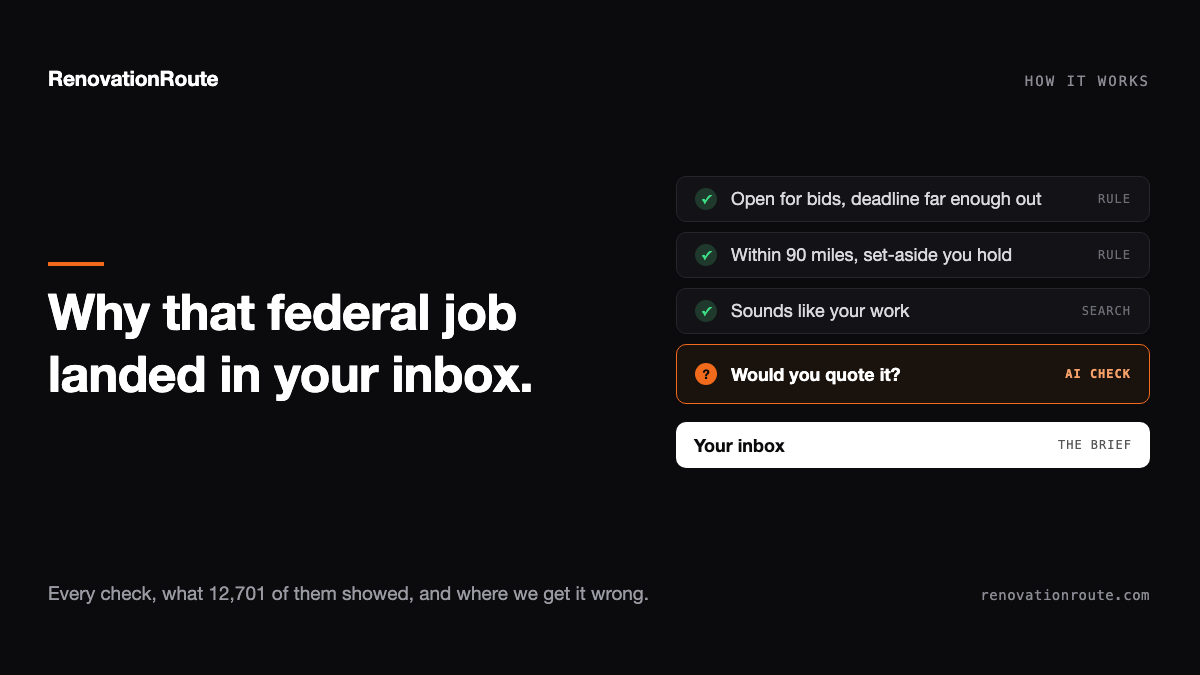
If a federal job brief from RenovationRoute landed in your inbox, it went through six checks to be matched to you, and one more before it was sent. Four of them are plain rules: the job is really open for bids, the deadline is far enough out, the site is within 90 miles of you, and you hold any set-aside certification it requires. One is a similarity search that finds contractors whose work sounds like the job. The sixth is a language model that reads the job and your company profile and answers one question: would you quote this? Then, right before the email goes out, a second model reads the finished email and can hold it back.
A research team recently published results suggesting that last kind of step can make matching worse. We pulled our own numbers to find out whether it does here. It doesn’t, but the numbers did turn up mistakes we’re now fixing.
The study that made us check
The AutoRMF-ML-Lab project tested ways to match written vulnerability reports to the right NIST and CMMC security control. Three results stood out:
- A small search model (110 million parameters), trained on their own labeled examples, picked the right control first 77.45% of the time.
- Having a much larger AI model (7 billion parameters) re-sort that model’s results dropped accuracy to 72%.
- Mixing in old-style keyword search dropped it to 13.65%, because the reports and the controls describe the same thing in different words.
We match contractors to federal construction jobs with a similar two-stage setup, so the obvious question was whether our AI step was hurting too.
How a job gets matched to you, step by step
1. The job has to be worth bidding
Before any matching happens, rules in our code throw out jobs a contractor can’t or shouldn’t chase:
- Not a real bid yet, or already awarded. We only match active solicitations and presolicitations. Sources sought, industry days, and award notices are out.
- Deadline too close. The response deadline has to be more than 3 days out when the brief is sent.
- Site visit already happened. If a scheduled walkthrough is in the past, you’d be bidding blind against people who walked the site.
- Restricted to an existing pool. Jobs open only to current MACC, MATOC, IDIQ, or BPA holders are skipped. If you’re not on the vehicle, you can’t bid.
- Likely wired. Notices flagged with sole-source intent, a named incumbent, or brand-name specs are skipped.
2. The job has to be fully read
We only match jobs where our analysis actually finished: a plain-English summary of the work, the trades involved, and either comparable past awards or a cost estimate. A job with a two-line notice and nothing attached doesn’t go out.
3. Find contractors whose work sounds like the job
Every job and every contractor profile is turned into a numerical fingerprint of what it describes, called an embedding. Jobs and contractors with similar fingerprints describe similar work. This is how “roof replacement” on a notice finds a company that calls itself a roofing contractor, even though the words don’t match.
We learned this one the hard way, same as the study. Our first version matched on keywords, and a job that said “roof replacement” never found firms listed as “Roofing Contractors.” Keyword matching is gone from this step.
The cutoff for “similar enough” is tight by default and loosens only when a local market is thin, so a niche job in a remote area still finds the few firms that could do it.
4. Distance and certifications
Plain rules again. Your company has to be within 90 miles of the job site, and if the job is set aside for small business, 8(a), HUBZone, SDVOSB, VOSB, WOSB, or Indian-owned firms, you have to hold that status.
5. Would you quote it?
For the contractors who pass all of that, a language model reads two things side by side: the job summary with its trades, and your company summary with your trades. It’s told to set aside distance, certifications, and federal track record, because the steps above already handled those. It answers from the owner’s point of view: is this your line of work? It returns a score from 0 to 100 and one sentence on why the job suits you, which we read when we check its calls.
A score above 50 passes. At 50 or below, the model judged it a trade you don’t perform.
6. A small number of contractors per job
No more than five contractors hear from us about any one job, so you’re not one of a hundred firms getting the same brief.
7. A last look at the email itself
Right before an email goes out, a second language model reads the finished email next to the job and your company profile. It answers two questions: does this pairing make sense, and is this email worth sending? If not, the email is held for us to review instead of sent. It can stop an email, never write or send one. If this check fails for a technical reason, the email still goes, because the checks above already did the filtering.
What the numbers showed
Over the last 60 days, step 5 scored 12,701 pairings of a contractor with a job, across 339 jobs and 8,016 companies. Every one of those had already passed the similarity search, the distance check, and the certification check.
The model rejected 62% of them. Only 4,801 pairings passed.
Here is how that splits by how close the similarity search said the match was:
| How close the similarity search rated the match | Pairings checked | Passed the “would you quote it” step |
|---|---|---|
| Closest | 903 | 78% |
| Close | 3,119 | 51% |
| Near our default cutoff | 7,231 | 31% |
| Loosened for thin markets | 1,448 | 18% |
The two stages mostly agree: the closer the similarity match, the more often the model says yes. But even among the closest matches, more than 1 in 5 get turned down. Past the default cutoff, most do.
That’s why the study’s result doesn’t carry over to us, for two reasons:
- Their AI step re-sorted a list. Ours decides who hears about a job at all. Taking it out wouldn’t give you a better-ordered list. It would put a lot more wrong-trade jobs in contractors’ inboxes.
- Their winning search model was trained on thousands of labeled right answers. Ours is a general-purpose model with no construction training. It’s good at finding work that sounds similar. It’s not built to tell whether a sheet-metal contractor would actually quote a hangar re-roof.
Where the model gets it wrong
A 62% rejection rate only helps if the rejections are right, so we read the eight rejections where the similarity search was most confident. Some held up. A roofing company turned down for an office rehab that called for controls work. An electrician who does EV chargers and hot tub wiring turned down for an MEP repair and utility installation job. Those are fair calls.
Some weren’t:
- General contractors turned down for a locker room renovation. Two firms that describe themselves as doing commercial renovations and public work both scored 40. The model’s reasons: one had “no plumbing or electrical capabilities,” the other “no demolition trade experience.” A general contractor subs those out. That’s how renovations get built. Those look like wrong answers.
- The model brought up things it was told to ignore. Its private notes on several rejections mention “no federal past performance” and “insufficient solicitation detail,” even though its instructions say to leave track record and notice quality out of the decision. If those thoughts are pulling scores down, they’re costing good matches. We’ve written new instructions telling it plainly to leave them out of its notes too, and they’re being tested along with the GC change below.
So the AI step earns its place, but it’s harsher than it should be in at least one way: it judges general contractors as if they had to self-perform every trade.
What we’re changing
- Telling the model how general contractors work. The new instructions are written: a GC who runs renovations and subs out the trades is a fit for a renovation job. They’re being tested before they go live.
- Grading its calls by hand. We built a tool that pulls a sample of matches, weighted toward the rejections the similarity search was most sure about, for us to grade ourselves. Every change to the instructions, starting with the GC one, is measured against those grades before it ships. If too many rejections turn out to be real fits, we adjust the instructions, not the cutoff.
- Keeping the rules as rules. Distance, certifications, deadlines, and pool restrictions stay in plain code. None of them are left to the model.
The model doesn’t send anything, set any price, or write any part of a bid. The matching model reads two short descriptions and makes one call, and the email check can only hold an email back. When either call is wrong, we want to be the ones who find it.
Get the jobs that fit your trade, already read
Pick your trades and area. We match federal construction jobs to you and send the brief: the work, the cost picture, and who has won there before.